How to Invite Users to a Team

iRobot and 6 other contributors
Last updated on Mar 22, 2022
Views: 58
View statistics:
- Past 24 Hours:
- 0
- Past 7 Days:
- 0
- Past 30 Days:
- 0
- All Time:
- 58
Comments: 0
No one has left comments on this guide. Will you be first?
Go to guide commentsCompleted: 0 1
No one has marked this guide "completed." Will you be the first?
1 person has marked this guide "completed." It's you — great job!
Favorites: 0 1
No one has favorited (and subscribed to) this guide. Will you be the first?
1 person has favorited (and subscribed to) this guide — and that's you!
Introduction
Go to step 1 ↓This guide demonstrates how to invite users to an existing team.
-
-
-
Starting on the homepage, hover over Community on the banner.
-
Click on Get Involved in the dropdown.
-
Click on Teams.
-
-
-
Click Invite Members, located just below the under the team avatar on the left side of the page.
-
-
-
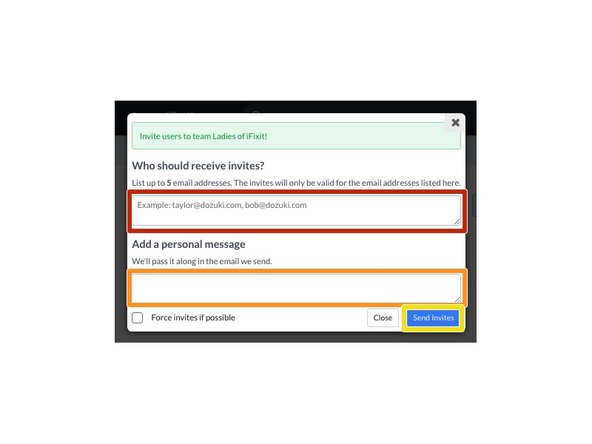
Enter the user's email address.
-
Add a personal message to be sent with the email invite.
-
Click Send Invites to send the invitations.
-
-