How to Make a Wiki Page Private

iRobot and 5 other contributors
Last updated on Mar 29, 2022
Views: 91
View statistics:
- Past 24 Hours:
- 0
- Past 7 Days:
- 0
- Past 30 Days:
- 0
- All Time:
- 91
Comments: 0
No one has left comments on this guide. Will you be first?
Go to guide commentsCompleted: 0 1
No one has marked this guide "completed." Will you be the first?
1 person has marked this guide "completed." It's you — great job!
Favorites: 0 1
No one has favorited (and subscribed to) this guide. Will you be the first?
1 person has favorited (and subscribed to) this guide — and that's you!
Introduction
Go to step 1 ↓There may be situations when you want to restrict access to a Wiki page. This guide demonstrates how to make a Wiki page private and only visible to Authors, Admins, and users that have the direct link.
-
-
-
Navigate to the Wiki page that you want to make private.
-
Click on the Edit button in the top-right of the page, beneath the site header.
-
-
-
To make the wiki page private, add the following syntax in the Additional Information section:
-
[flag|private]
-
Scroll to the bottom of the page and click Save.
-
-
-
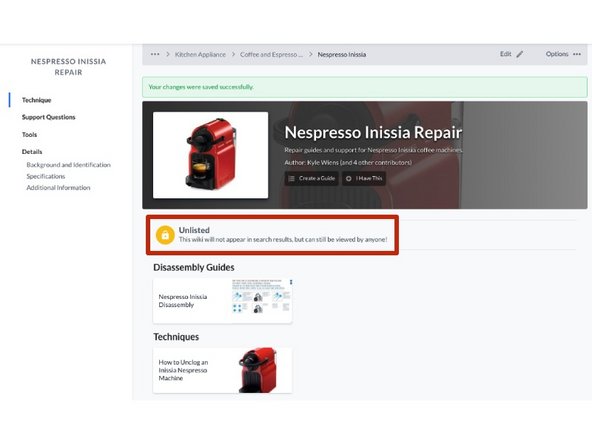
After you click Save, you are automatically redirected to view the wiki page.
-
You will notice that the Unpublished flag appears above the wiki page content, this provides you a visual verification that it is private.
-
-