
How to Create a Wiki Page

iRobot and 8 other contributors
Last updated on Nov 15, 2022
Views: 214
View statistics:
- Past 24 Hours:
- 0
- Past 7 Days:
- 0
- Past 30 Days:
- 0
- All Time:
- 214
Comments: 0
No one has left comments on this guide. Will you be first?
Go to guide commentsCompleted: 2 3
2 people have marked this guide "completed." Will you be next?
3 people have marked this guide "completed." Including you — great job!
Favorites: 0 1
No one has favorited (and subscribed to) this guide. Will you be the first?
1 person has favorited (and subscribed to) this guide — and that's you!
Introduction
Go to step 1 ↓This guide demonstrates how to create a wiki page.
There are two main information sharing document types: guides and wikis.
-
-
-
Starting from the home page, hover over Community and then click on Get Involved.
-
Click on the Contribute tab.
-
Click on Create a new device page.
-
-
-
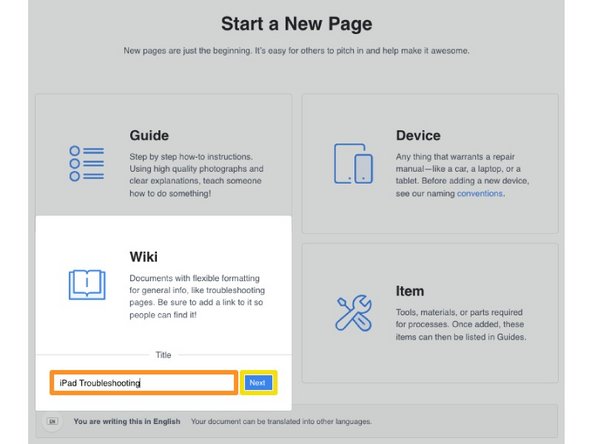
Start a New Page will open.
-
Select Wiki.
-
Give your new wiki a title.
-
Click on the Next button.
-
-
-
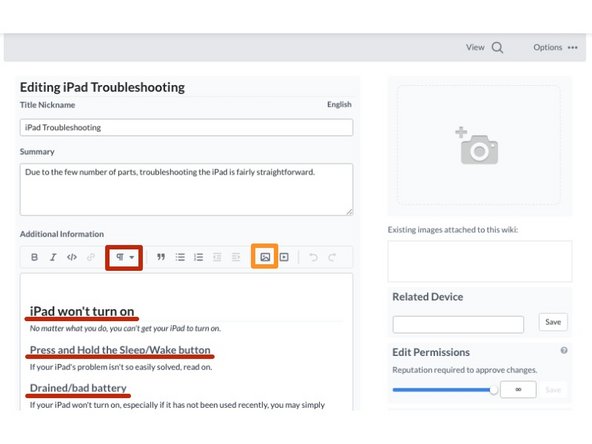
Insert your wiki page content.
-
Use the text editor to create formatting within your wiki. The Paragraph dropdown will allow you to create Headers and Subheaders to help organize your text.
-
You can upload PDF documents and Images to your wiki page to better illustrate the information you're sharing.
-
-




Cancel: I did not complete this guide.
2 other people completed this guide.