How to Edit an Attached Document

iRobot and 2 other contributors
Last updated on Mar 17, 2022
Views: 51
View statistics:
- Past 24 Hours:
- 0
- Past 7 Days:
- 0
- Past 30 Days:
- 0
- All Time:
- 51
Comments: 0
No one has left comments on this guide. Will you be first?
Go to guide commentsCompleted: 0 1
No one has marked this guide "completed." Will you be the first?
1 person has marked this guide "completed." It's you — great job!
Favorites: 0 1
No one has favorited (and subscribed to) this guide. Will you be the first?
1 person has favorited (and subscribed to) this guide — and that's you!
Introduction
Go to step 1 ↓This guide demonstrates how to edit a document that is attached to an iFixit guide.
-
-
-
Open the guide with the attachment(s) that need editing. Click on the Edit button in the top-right of page, just beneath the site header.
-
Click on the Details tab at the top of the page.
-
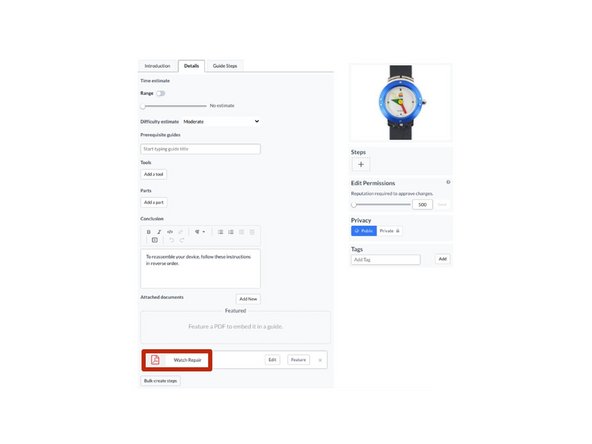
Scroll down to the Attached Documents section.
-
Click on the Edit button to edit the document.
-
-
-
To edit the filename, click in the Filename field beneath Edit the Filename and enter the file name.
-
Click Submit to save your changes.
-
To upload a new file or different version of the existing file, click on the file icon which will open the Media Manager. Now you can upload the new file or a new version of the existing file.
-
Click Submit to save the new version.
-
-